If you have run the preload program during the installation of NetStore, the Backoffice will automatically be configured with one application (i.e. NetStore) and the following two users:
- Default NetStore User: Applicable for a user that is not signed on.
- NetStore Admin User: Applicable for the user who is responsible for maintaining the NetStore Administration application.
After the preload is run, the NetStore application is loaded with values. You can access the application and change any values.
- Click Application.
- You access the Application window:
- Description
- Leave or change the description of the application.
- For future use only.
- Default user
- This is the preloaded Default NetStore user – (i.e. applicable for users who have not signed on).
- Default language
- You can choose from the following values:
- Company (company’s system language)
- User (Default NetStore User’s language), plus any supported language.
- Select the applicable value from the drop down list.
- Tip: The selections in the drop down list depend on the Data restriction set up for the Supported languages. It is recommended that you read the instructions in Configure and connect data restrictions to learn how to configure your site’s applicable languages.
- Default client locale
- The following values are valid:
- Server (web server’s locale)
- User (whatever is configured on the User account), plus any Java supported locales.
- Select that applicable from the drop down list.
- Maximum sign on attempts
- If any user enters an incorrect password, then after the X number of times stated here, the user account will be disabled. The user would have to contact, e.g., the web administrator to be reinstated.
- Session time-out
- If any user (whether signed on or not) is inactive for the time period stated here, the session will expire and will be handled by the Session tracker cleanup interval described below.
- Session tracker cleanup interval
- The value here governs how often (in seconds) this thread will be run. Any expired session that has reached the number specified in Session time-out above will be terminated. The user will receive a message that the session has been timed-out.
- No of days to keep temporary order
- When a NetStore user enters an order, the final step is to confirm it (by performing the Close order action). A NetStore order will not become a real Enterprise/DC1 Distribution sales order until it has been closed/confirmed by the user entering the order lines.
- Interrupted orders (non-confirmed) will remain in the Enterprise/DC1 Interface files until they are confirmed by the user or deleted manually by the web administrator. The system suggests deletion of all non-confirmed orders older than a certain date in the Order transfer function. This date is calculated from the value you enter in this field. The system will suggest today’s date minus the number of days entered in this field.
- Update site visits
- Check this box if you want to update the number of visits per signed on user. This is currently shown on the Start page of NetStore when the user signs on.
- Update site visits for default user
- Check this box if you want to update the number of visits to the site. This is currently shown on the Start page of NetStore.
Panel image
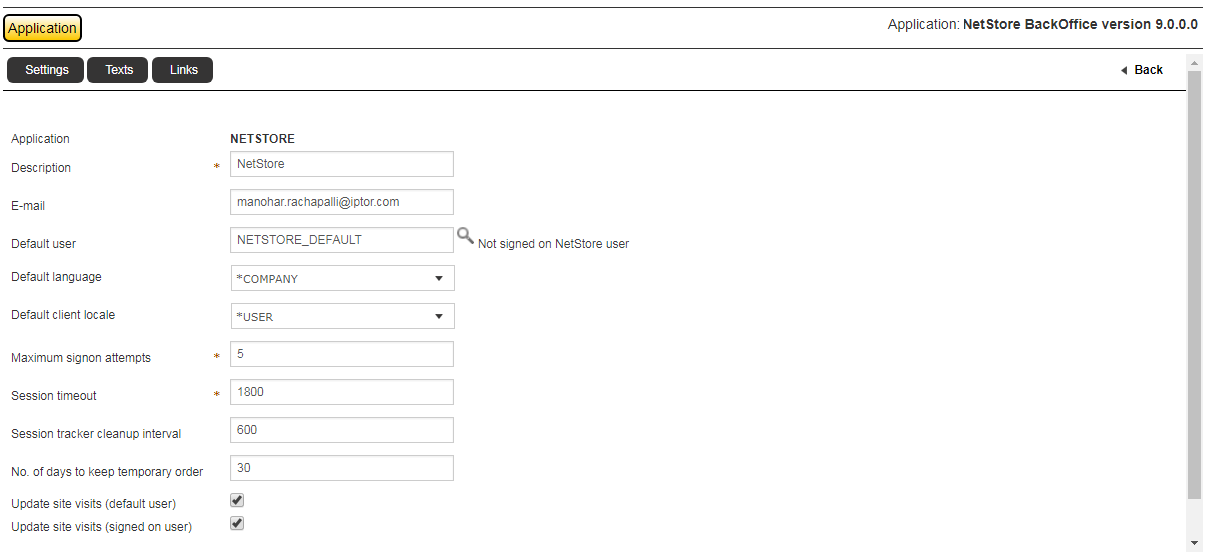
You can change any of the following values:
Exit the routine.
Related topics
- About setting up and managing your site
- Configure/modify settings
- Configure the settings for sundry users
- Configure and connect data restrictions
- Create and connect texts
- Configure pages
- Define and connect links
- Configure and connect multimedia
- Create and connect descriptions
- Configure shipment tracking
- Translation