In DC1 Distribution the following two routines handle the movement of goods:
- Internal Replenishment (IR orders)
- Work with inventory (Inventory movements panel)
Note: If moving goods between two EU countries, only the Internal Replenishment routines are valid. Internal replenishment orders can still be used for movements between two warehouses in the same country or between one EU country and a country outside EU. Those movements will not be reported in the VAT declaration or EU VAT sales report.
All internal movement of goods between two EU countries must be reported in the VAT declaration and the EU VAT sales report. These are known as EU IR orders. An order is considered an EU IR order if the From warehouse country and the To warehouse country of the order are two different EU countries and a VAT registration number is defined.
From a reporting perspective, the movement of goods between your own EU warehouses is treated the same way as an intra-community sale and intra-community purchase, however, no supplier invoice is produced for these types of transactions. For EU internal movements, DC1 Distribution creates the VAT transactions. The Work with Country/Country VAT file holds the VAT handling codes to be dedicated for EU internal replenishment sales order and purchase order transactions. Each combination of trader countries (countries where the company is registered for VAT) must be defined. The VAT handling codes are to be entered in the EU IRO sales and EU IRO purchase fields. For an EU IRO purchase, you can override this field on Item level if the item carries another VAT rate.
The search for the correct VAT handling code is as follows:
| EU IRO sales | 1. EU IRO sales field in the Work with country/country VAT file 2. Default VAT sales field in the DIS control file |
| EU IRO purchase | 1. EU IRO purchase field in the Item file (Country/Country VAT information panel) 2. EU IRO purchase field in the Work with country/country VAT file 3. Default VAT purchase field in the DIS control file |
EU internal replenishment sales order – VAT transaction
At the time goods are picked up from stock for an EU internal replenishment sales order the bookkeeping file will be updated with three transactions (see below). The data required to create the VAT record is as follows:
Sales order type
Registration of an EU IR and non-EU order is done using the same sales order type. An order is defined as an EU IR order if From warehouse country and To warehouse country of the order are two different EU countries.
VAT handling code and VAT accounting
The VAT handling code to be dedicated for EU internal replenishment sales order transactions needs to be defined and connected to the EU IRO sales field in the Work with Country/Country VAT file. The EU IRO sales code must be set up for each combination of trader countries (countries where the company is registered for VAT). Transaction type 501 exists in the Transaction type table to set up the bookkeeping for the EU sales VAT transaction.
Goods in EU transfer transaction type
Transaction type for Goods in EU transfer (907) exists in the Transaction types table. A dedicated account for which the goods movement transaction is to be generated can be set up for transaction type Goods in EU transfer (908).
When the pick list is created for the EU IR sales order the following three transactions are updated in the bookkeeping file:
| 901 Stock value |
| 908 Goods in EU transfer |
| 501 Output VAT for EU IR sales |
EU internal replenishment purchase order – VAT transaction
At the time goods are received for an EU internal replenishment purchase order the bookkeeping file will be updated with four VAT transactions (see below). The data required to create the VAT records is as follows:
Purchase order type
The purchase type defined for the EU IR order type will be used to register EU internal replenishment purchase order. An order is defined as an EU IR order if From warehouse country and To warehouse country of the order are two different EU countries.
VAT handling codes for VAT transactions
The defined VAT handling code entered for EU IRO purchase either on the item code,(Country/country VAT information panel) or the Country/country VAT file defines which percentage to use for calculation of the VAT amount. The EU IR purchase field on Item file, Country/country VAT level gives the possibility to use the same VAT handling code for entering EU purchase invoice in DC1 Financials and creating VAT for an EU internal movement in DC1 Distribution. Transaction types 502 and 503 exist in the Transaction type table to set up the bookkeeping for the EU purchase VAT transaction.
Transaction type for VAT
When goods are received into stock for the EU IR purchase order the following four transactions are updated in the bookkeeping file:
| 901 Stock value |
| 908 Goods in EU transfer |
| 502 Output VAT for EU IR purchase |
| 503 Input VAT for EU IR purchase |
Example: EU Internal Replenishment VAT Declaration
Company has warehouses in two EU countries: SE and GB. As requested by EU regulations the company must be registered for VAT both in SE and GB.
If the goods are transferred between SE and GB warehouses and the owner of the goods is not changed then the Value of the goods transferred (Inter-community goods movements) is a VAT free amount but needs to be declared on the VAT declaration and on the EU VAT sales report.
Sales FROM
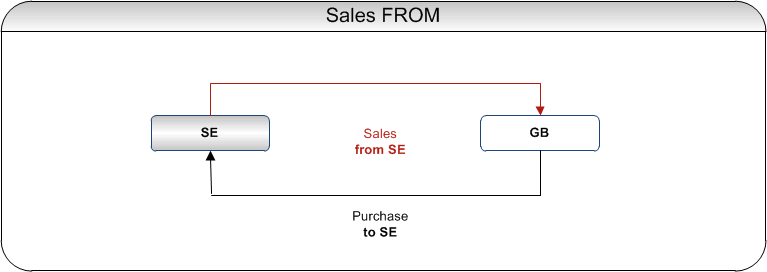
For the country of trader SE the company declares:
- On the VAT declaration
- The acquisition value of goods transferred FROM the warehouse in SE to the warehouse in GB. On the Swedish declaration the amount is to be entered in the BOX 35 (Sales of goods to another EU country).
- The value of goods transferred TO warehouse in SE from warehouse in GB. On the Swedish declaration the amount is to be entered in the BOX 20 (Purchases of goods from another EU country).
- VAT calculated on the value reported in the BOX20 (Purchase of goods from another EU country). On the Swedish declaration the values are to be entered in the BOXes 30-32: Output VAT on purchases (25%, 12% and 6%)
- VAT calculated on the value reported in the BOX20 which is eligible to be deducted (EU internal replenishment VAT is eligible for deduction according to the same rules which are applicable for any other VAT). On the Swedish declaration the value is to be entered in BOX48 (Input VAT).
- On the EU VAT Sales Report, the value reported in the VAT declaration in the BOX 35 (Sales of to goods to another EU country) needs to be reported.
Purchase TO

For the country of trader GB the company declares correspondingly the sales from GB and purchase to GB.
- On the VAT declaration
- The acquisition value of goods transferred FROM warehouse in GB to warehouse in SE. Sales of goods to another EU country.
- The value of goods transferred TO warehouse in GB from warehouse in SE is to be reported as Purchases of goods from another EU country.
- VAT calculated on the value reported in the Purchase of goods from another EU country to be reported as Output VAT on purchases.
- VAT calculated on the value reported as Purchases of goods from another EU country which is eligible to be deducted (EU internal replenishment VAT is eligible for deduction according to the same rules which are applicable for any other VAT) is to be reported as Input VAT (to be deducted).
- On the EU VAT Sales Report, the value reported in the VAT declaration as Sales of to goods to another EU country needs to be reported.
For more information about VAT declaration see About declaring VAT.